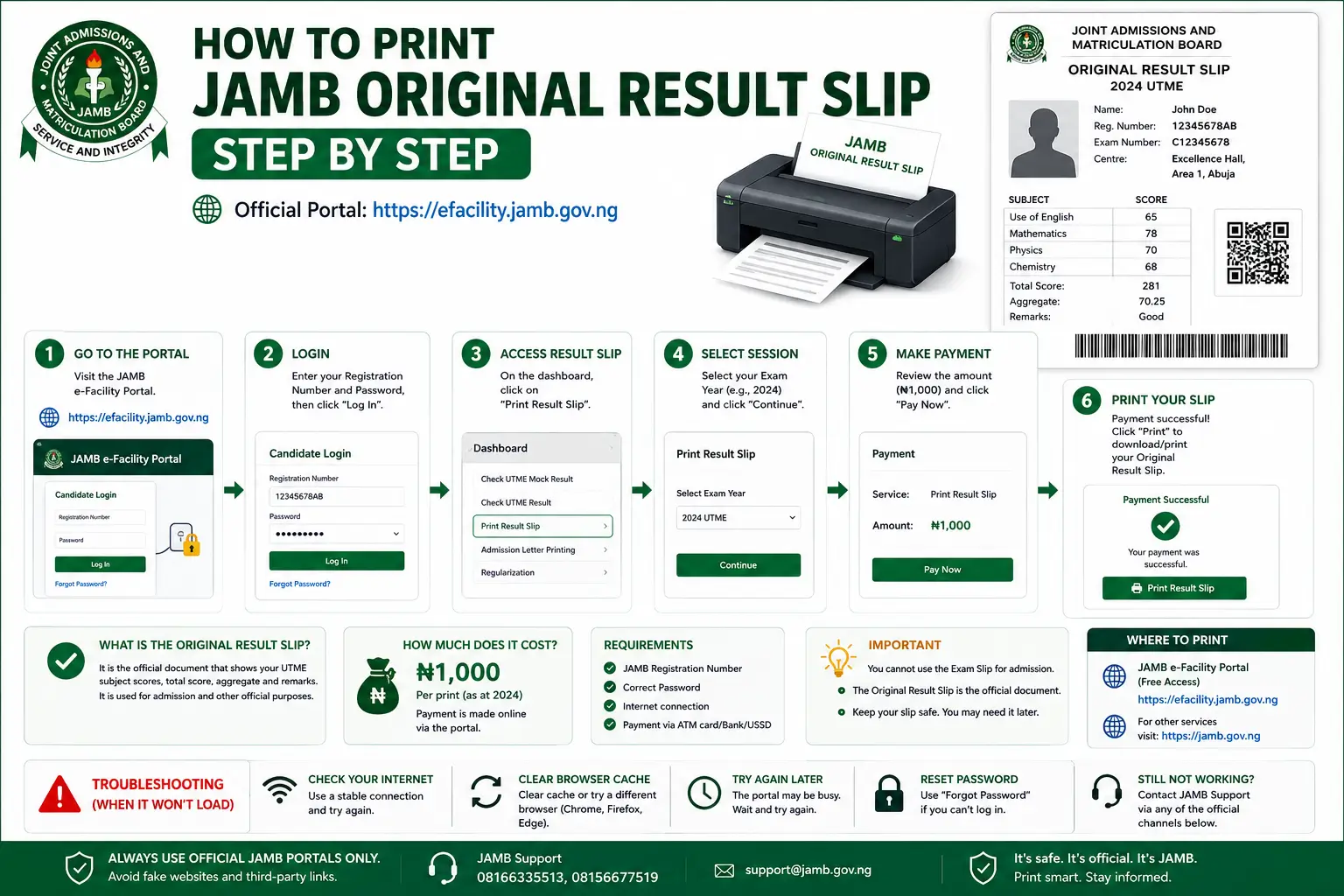
Short answer:
Log in to efacility.jamb.gov.ng, click “Print Result Slip”, pick your exam year, pay the ₦1,500 fee, then download the PDF and print it in colour on A4 paper. It takes about five minutes when your login details are correct. Printing for the 2026 cycle has been open since 17 June 2026.
The Original Result Slip is the document your school actually asks for. Not the SMS. Not a screenshot of your score. This page covers the exact steps, what to check before you pay, and what to do when something goes wrong.
What is the JAMB Original Result Slip?
It is the official version of your UTME result, issued by JAMB itself. It carries your passport photograph, your four subject scores, your total, your institution and course choices, your national ranking, and JAMB’s own security features.
The SMS score is not a replacement. Universities, polytechnics and colleges of education will not accept it at post-UTME screening. Only the printed Original Result Slip counts, which is why schools keep asking for it.
When did 2026 result slip printing actually open?
17 June 2026. A lot of pages still say 18 May, and this is worth explaining because it confuses thousands of candidates every year.
JAMB did announce 18 May 2026 as the start date. Then the date was pushed back while JAMB finished its foreign-centre examinations and the mop-up exam for candidates hit by technical and biometric problems in April. Printing opened once that was done.
| Date | What happened |
|---|---|
| 15 May 2026 | JAMB announces printing will begin on 18 May |
| 19 May 2026 | Printing delayed, waiting on foreign exams and the mop-up round |
| 13 June 2026 | Mop-up exam held |
| 16 June 2026 | Mop-up results released |
| 17 June 2026 | Original Result Slip printing opens for all 2026 candidates |
The lesson for future years: an announced JAMB date is a plan, not a promise. If a mop-up round or a foreign centre runs late, the date moves. Check the official JAMB website rather than planning around a date you read on any guide, including this one.
What do you need before you start?
- The email address and password you set when you registered. Not your phone number, and not your registration number by itself.
- Your JAMB registration number. For 2026, it looks like 26123456HG: two digits for the exam year, then eight digits, then two letters. It is printed on your exam slip.
- ₦1,500 on a card, through Remita, or by transfer.
- Chrome or Brave if you are using a phone. Opera Mini squeezes pages and often fails to open the slip PDF.
If you have lost your login details, do not create a second profile. Duplicate records cause problems that only an in-person JAMB visit can sort out. Use the official reset instead, which we cover in our e-Facility login guide.
How do you print your JAMB Original Result Slip?
- Step 1. Log in to e-Facility. Type efacility.jamb.gov.ng into the address bar yourself instead of searching for it. Sign in with your registered email and password. Check that the address bar ends in jamb.gov.ng before you enter anything.
- Step 2. Open “Print Result Slip”. You will find it in the list of services on your dashboard. Pick the correct examination year from the dropdown, then enter your registration number.
- Step 3. Pay the fee shown on the screen. Click “Continue with Payment” and finish it. The 2026 figure is ₦1,500. Pay exactly what JAMB’s screen says and nothing more. This is a one-time charge for that exam year, so you will not be billed again for another copy. There is more in our breakdown of the JAMB result slip fee.
- Step 4. Check every detail before you print. Confirm your name, photograph, four subject scores, total, and institution choices. Your name should match your NIN. If anything is wrong, stop and contact JAMB instead of printing it.
- Step 5. Download the PDF, then print in colour on A4. Save the file first, even if you are printing straight away. A faded or black and white copy can be questioned at screening, so use colour where you can.
What should you do after printing it?
- Print at least two copies. Screening, clearance and school registration can each ask for one.
- Do not laminate it. Some schools reject laminated slips because they cannot check the paper. Use a clear folder instead.
- Keep a digital copy on your phone and in your email. The slip does not expire, and you may be asked for it years later for NYSC, job applications, or postgraduate admission.
- Check that the emailed copy arrived. JAMB sends one to your registered address automatically. That email is your backup way to reprint.
What if something goes wrong?
- The portal is slow or will not load. Traffic spikes hard in the first days after printing opens. Try early morning or late at night, and stop refreshing over and over, because that only adds to the load.
- You paid, but no slip appeared. Wait a few minutes and reload your dashboard before doing anything else. Confirmations can lag. Do not pay a second time straight away, because that creates a double-charge dispute.
- The PDF will not open on your phone. Switch to Chrome or Brave. Opera Mini is usually the problem. If it still fails, email the file to yourself and open it on another device.
- A detail on the slip is wrong. Do not use anyone who offers to fix it quietly. Contact JAMB through official channels, or go to an accredited CBT centre in person with your registration slip and a valid ID.
Every error message and what causes it is covered in our JAMB slip printing troubleshooting guide.
Warning: There is no official JAMB mobile app for checking results or printing slips. Every “JAMB Result Checker” app you see in an app store is made by someone else. Editing an SMS to change a score is a crime, and candidates have been arrested over faked 2026 UTME scores. The only valid slip comes from efacility.jamb.gov.ng.
Frequently asked questions
When did JAMB Original Result Slip printing open for 2026?
17 June 2026. JAMB first announced 18 May, then delayed it while foreign-centre exams and the 13 June mop-up exam were finished. Mop-up results came out on 16 June, and printing opened the next day.
How much does it cost to print the Original Result Slip?
₦1,500 on efacility.jamb.gov.ng for the 2026 cycle, charged once per exam year. If a CBT centre does it for you, their charge is separate, and the total often reaches about ₦3,000.
Can I print my result slip on my phone?
You can pay and download the PDF on a phone using Chrome or Brave. Opera Mini often fails to open it. The file still needs printing on A4, so save it and take it to a business centre or CBT centre.
Can I print a result slip from an earlier exam year?
Yes. Log in to e-Facility and pick that year from the examination year dropdown. The fee applies per exam year, so an older year you never paid for will need its own payment.
Is the SMS result the same as the Original Result Slip?
No. The SMS is only a score notification, and schools will not accept it at screening. The Original Result Slip carries your photograph, subject breakdown, and national ranking, and that is the document schools require.
Does the Original Result Slip expire?
No. It is a permanent record tied to that year’s UTME. You may be asked for it during admission, clearance, scholarship applications, NYSC registration, or postgraduate study years later.
What if my result is not showing on e-Facility at all?
JAMB holds back some results while they are being investigated, usually over suspected malpractice or a registration mismatch. Visit your JAMB state office in person with your registration slip and a valid ID. No third party can fix this for you.
Not sure which document you need? Compare them in our guide on exam slip vs result slip, or start from the JAMB slip printing hub.